
Waymo
Waymo LLCMaps & Navigation
4.95.00K Reviews
- Version
- 26102602.1013137503-release
- Installs
- 1.00M
- Age Rating
- Everyone
Screenshots
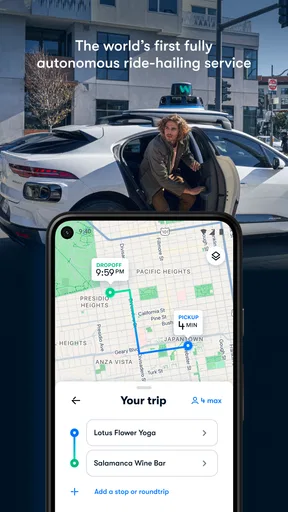
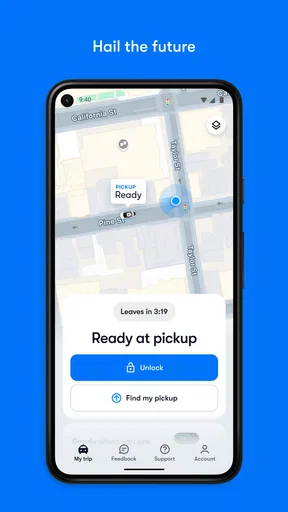
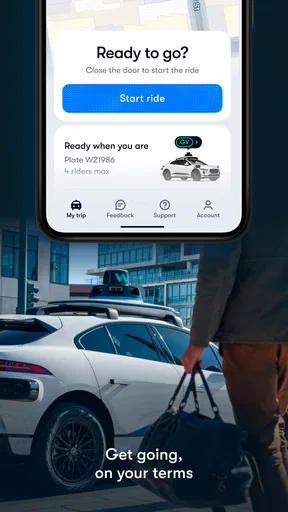
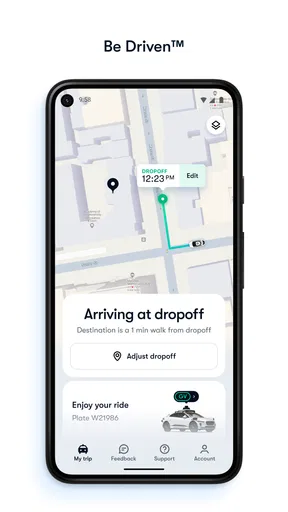
Our Review of Waymo
 Analysis by Appyee
I’d judge a ride-hailing app by more than how quickly it gets me moving. With a driverless service, I also want to know what choices I can actually see and make, and where my own comfort matters. Waymo puts that question front and center: the ride itself is handled by an autonomous vehicle, while the app is the point where a passenger arranges and follows the trip. That can feel refreshingly simple, but it also makes trust part of the everyday experience rather than an abstract technology debate.
What trust looks like before a ride
Waymo is a free Maps & Navigation app from Waymo LLC. It has a 4.9 average from around 37,000 ratings, and more than a million installs. Those figures suggest that many people have tried it, but they don’t tell me whether it will suit my route or how comfortable I’ll feel in the car. I’d treat them as context, not a substitute for checking whether the service is available where I need to go and deciding whether a driverless trip is right for me.
The app is rated for Everyone, and its current version is 25112407-843245214; it requires Android 8.0 or later. It was released on April 20, 2021. That gives Android users a few practical compatibility details to check before installing, especially if they use an older phone. I’d also separate the app experience from the ride experience: a clean booking flow can be reassuring, but confidence in an autonomous car comes from understanding the trip and being comfortable with the arrangement.
Visible choices matter
When I use a ride app, I want the important decisions to be clear before I commit: where I’m being picked up, where I’m going, and what I should do if plans change. For a driverless service, that clarity carries extra weight because there isn’t a human driver to ask at the curb. I’d take a moment to review the pickup point and destination in the app rather than tapping through quickly, particularly at a busy entrance or a location with several possible stopping places.
I also wouldn’t assume that a safety-related phrase tells me exactly what controls are available. The useful habit is to look at the options presented during the booking and ride, read any prompts, and know where in the app to find help before setting off. That is a practical way to keep agency in the passenger’s hands without guessing about features or policies that may vary. If I can’t find an option I need, I’d pause and choose a familiar transport alternative rather than discovering the limitation mid-trip.
Data-sensitive moments on the journey
Location is central to arranging a ride: the app needs a pickup and destination to make the trip useful. That makes the moments before booking worth a quick check. I’d confirm the pin is on the correct side of a street, avoid entering a destination in a hurry while sharing my screen or phone, and consider whether a nearby public pickup point is more comfortable than giving a precise entrance. These small choices improve the practical details of a journey without requiring me to make assumptions about how information is stored or used.
Permissions and account settings deserve the same careful look. I’d review the permission requests shown by Android and the controls visible inside the app, granting only what I’m comfortable with and checking again if the app’s behavior changes. I would not treat a permission prompt as a full explanation of data practices; it is one visible decision, not the whole privacy picture. If data handling is a deciding factor for you, read the app’s current privacy information and account controls before riding, then decide whether the convenience is worth it.
Getting Started with Waymo
First things first, setting up Waymo is a breeze. You download the app, sign up, and you’re good to go. Once you're in, the interface is sleek and intuitive, making navigation a piece of cake. It’s like Uber, but instead of getting a driver, you’re getting a whole car that drives itself. Wild, right?
The Techie Stuff
Waymo uses cutting-edge technology to ensure safety and efficiency. The app integrates with the car’s system, which is equipped with tons of sensors, cameras, and radars. It’s like the car has eyes, ears, and a brain of its own. I found it fascinating how smoothly the car navigated through traffic, obeying all the signals and even recognizing pedestrians. It’s like having a super-smart robot chauffeur.
That feeling of smoothness is compelling, but I wouldn’t use a comfortable ride as proof that every situation will be effortless. Autonomous driving still involves an unfamiliar handoff: I am a passenger rather than the person controlling the vehicle. If that distinction makes you uneasy, a conventional ride with a human driver may be the better fit, at least until you feel ready to try this format. For a first ride, I’d choose a straightforward trip rather than a tight schedule or a complicated series of stops. That gives me room to learn the rhythm without making an important appointment depend on a new experience.
Riding the Wave of Convenience
Once you book a ride, the car arrives at your location. No need to worry about parking or dealing with traffic stress. You just hop in, sit back, and relax. During my test ride, I couldn’t help but feel like I was in a sci-fi movie. The car handled everything, from lane changes to merging onto highways, with such precision. It’s not just a ride; it’s an experience.
The convenience is most valuable when it solves a real chore. Imagine leaving a café with a bag in one hand and a phone in the other, then arranging a ride to a nearby appointment. I’d first step somewhere safe to check the pickup pin, then make sure I can recognize the intended meeting spot instead of standing in a crowd watching the map. Once the vehicle arrives, taking a moment to confirm that the trip details match what I selected is a sensible routine. The small pause can prevent a wrong turn in the plan, especially when several entrances or curbside spaces look alike.
Compared with ordinary map apps, Waymo serves a different purpose: a navigation app helps me plan or follow my own journey, while this app is for arranging a ride in an autonomous vehicle. Compared with familiar ride-hailing services, the central difference is the absence of a human driver. That may appeal if you like a quieter, more independent passenger experience, but it removes the usual chance to ask a driver for help with a confusing entrance or an unusual request. I’d use a standard ride service when I need that human flexibility, and a navigation app when I’m driving myself or simply comparing routes.
Safety First!
Now, I know what you're thinking. Is it safe to let a car drive itself? Waymo has got that covered. The app provides real-time updates on your ride, and emergency features are just a tap away. Plus, the cars are equipped with backup systems, so there's always a fail-safe in place. I felt secure knowing that safety is a top priority for Waymo.
For my own peace of mind, I’d keep my phone charged and accessible, pay attention to any instructions shown in the app, and avoid starting a ride when I’m distracted or rushing. Those habits are useful in any hired vehicle, but they matter more when I’m learning a driverless service and may need to respond to an unfamiliar prompt. If an issue arises, I’d use the help or emergency options actually displayed rather than relying on assumptions about what a particular button does. A passenger who needs constant reassurance from a person beside them may find a conventional ride more comfortable.
Who will get the most from it?
I think Waymo is best suited to curious passengers who are comfortable trying autonomous transport and whose routine trips fit the service available to them. It can also make sense for someone who prefers to be a passenger, wants to avoid parking, or simply wants to experience how a driverless ride feels. I would not make it my default for a time-critical journey until I had checked the pickup and destination flow and felt confident using the service.
It is less suitable if you strongly prefer a human driver, need to discuss a special request in person, or feel uneasy being responsible for your own choices during a trip. It may also be the wrong tool if your main need is turn-by-turn guidance for a car you are driving: a conventional navigation app is built for that task. These aren’t criticisms of the autonomous approach so much as practical boundaries. The right choice depends on whether the service matches the journey, not on whether driverless technology sounds impressive.
Before making it part of a routine
I’d start with one uncomplicated ride and treat it as a chance to learn the app, not as a test of courage. Check whether the pickup location is easy to reach, leave a little flexibility around the appointment, and make sure the phone is ready before you request the car. Afterward, consider what felt clear and what made you hesitate. That personal check is more useful than deciding from a headline or rating alone, because comfort with an autonomous ride varies from person to person.
If you are deciding whether to install it, the practical questions are simple: does the service cover the trip you actually take, are you comfortable with a driverless vehicle, and can you find the controls and information you need before riding? I’d also review the current permission prompts, privacy information, and account settings if those are important to you. If the answers work for your situation, the free app is an approachable way to try a different kind of ride; if not, a human-driven service or a standard map app is a perfectly sensible alternative.
Future Forward
Using Waymo feels like stepping into the future. It’s not just about getting from one place to another; it’s about changing how we think about transportation. The app is constantly updating and improving, which makes me excited to see what’s next. Who knows? Maybe we’re on the brink of a driving revolution.
My cautious take is that the novelty should come second to a few ordinary checks: a route that suits the service, a pickup point I can identify, and enough time to handle a small snag without stress. I’d be willing to try Waymo when those pieces line up, but I wouldn’t assume an autonomous ride is automatically easier for every passenger or every errand. It’s a distinctive option in Maps & Navigation, and its value comes from whether its driverless format fits the way I travel.
To wrap it up, if you’re curious about autonomous vehicles or just want to try something new, give Waymo a shot. It’s a glimpse into the future of travel, and it just might change the way you view your daily commute. So, what are you waiting for? Hop on the driverless bandwagon and enjoy the ride!
Privacy and Permissions
See what permissions an app requests and how it handles your data.
- Location
- approximate location (network-based), precise location (GPS and network-based)
- Camera
- take pictures and videos
- Other
- view network connections, pair with Bluetooth devices, access Bluetooth settings, measure app storage space, full network access, control Near Field Communication, run at startup, control vibration, prevent device from sleeping, read Google service configuration
Verdict
Strengths of Waymo
- User-friendly interface simplifies navigation.
- Advanced safety features ensure secure rides.
- Eco-friendly with electric vehicle options.
- Highly accurate GPS for precise pickups.
- Responsive customer support for quick assistance.
Limitations of Waymo
- Limited availability outside major cities.
- Higher fares during peak hours.
- Requires strong internet connection.
- Occasional app crashes reported.
- Limited language support for non-English speakers.
Similar Picks in This Category
View All
Uber - Request a ride
Uber Technologies, Inc.4.7


inDrive. Rides with fair fares
® SUOL INNOVATIONS LTD4.8

Yandex Go: Taxi Food Delivery
Mikromobilnost LLC Belgrade4.8

Bolt: Request a Ride
Bolt Technology4.8

Rapido: Bike-Taxi, Auto & Cabs
Rapido Bike Taxi4.8
Frequently Asked Questions
What is Waymo and how does it work?
Waymo is an autonomous vehicle service that offers self-driving rides through its app. Users can request a ride, and a Waymo vehicle will arrive to take them to their destination without a human driver. The service leverages advanced AI technology to navigate roads safely and efficiently.
Is Waymo available in my area?
Waymo is currently available in select cities, primarily in the United States, with plans for expansion. To check availability, download the Waymo app and enter your location. The app will inform you if the service is operational in your area or provide updates on future availability.
How safe is Waymo compared to traditional ride-sharing services?
Waymo prioritizes safety by using a complex system of sensors, cameras, and AI to navigate. The vehicles undergo rigorous testing and have various safety protocols in place. While no system is infallible, Waymo strives to minimize risks and has a strong track record in autonomous safety.
What should I do if there is an issue during my Waymo ride?
If you encounter any issues during a Waymo ride, use the in-app support feature to contact customer service. The app provides real-time assistance and can address concerns immediately. Additionally, vehicles are equipped with an emergency button to connect you with support directly.
How does Waymo ensure user privacy and data security?
Waymo employs robust data encryption and strict privacy policies to protect user information. The app collects only necessary data to enhance service quality and complies with legal standards for data protection. Users can review privacy policies within the app to understand data usage.
